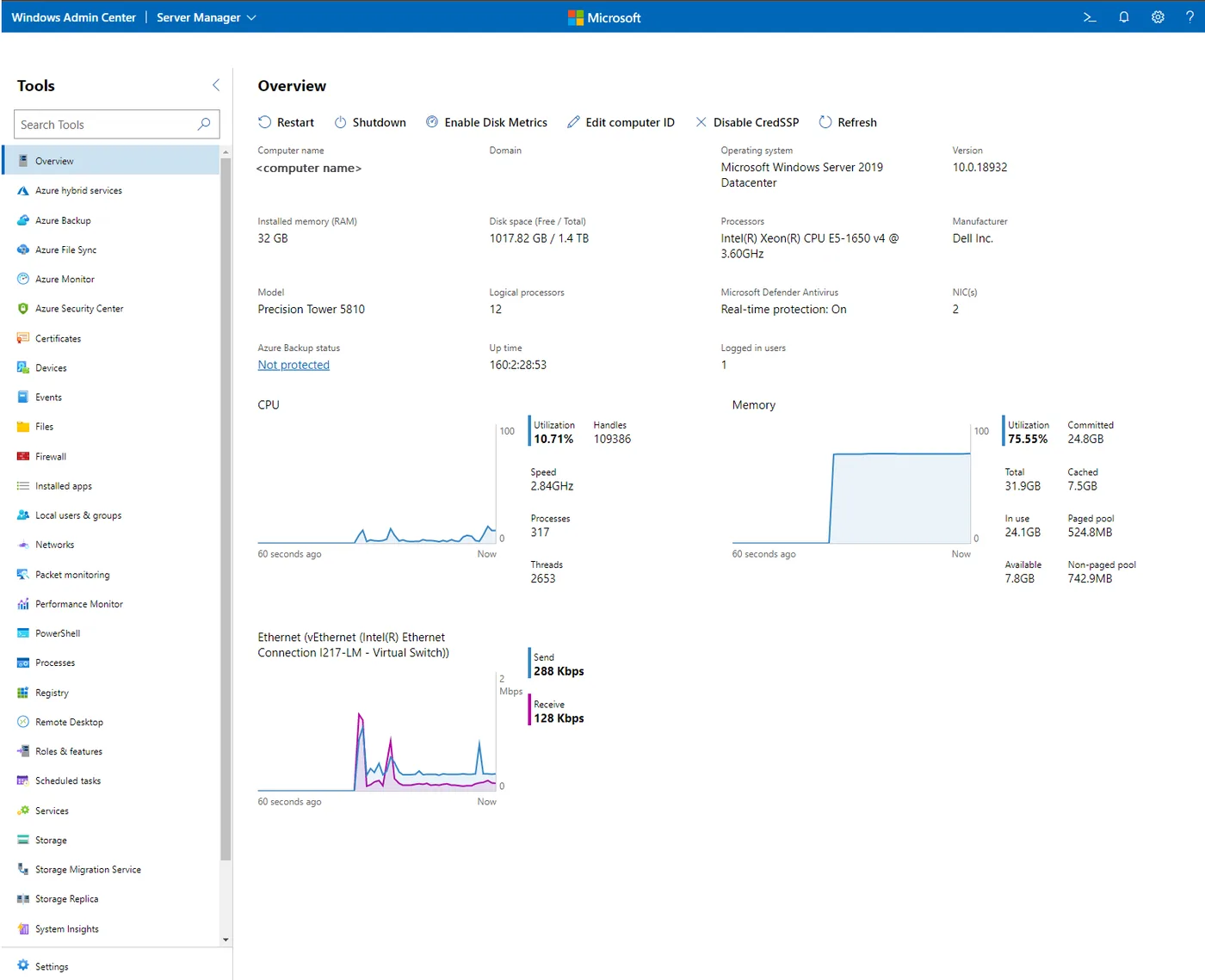
You’ve just stood up a Server Core box to run a line-of-business app, because a smaller attack surface and fewer reboots sounded sensible. Now the vendor’s support engineer wants you to check a service, look at the event log, add a firewall rule and grow a volume — and sconfig only takes you so far. Windows Admin Center (WAC) is Microsoft’s answer to that moment. It is a gateway you install once, then a browser tab that gives you Server Manager-style tools for any server you can reach over WinRM, Core or Desktop Experience alike.
What it does
WAC is a locally deployed, browser-based toolset. The gateway runs as a service; you open it in Edge or Chrome and add connections — servers, clusters, Windows PCs — by name, from Active Directory, or from a CSV. For a server connection you get tools for:
- Overview, performance, and a restart/shutdown switch
- Events, Services, Processes, Scheduled tasks and Installed apps
- Files and file sharing, Storage, Volumes
- Firewall, Networks, Roles & features, Updates
- Registry, Local users & groups, Certificates
- Remote Desktop (an in-browser RDP client) and a PowerShell console
- Hyper-V virtual machines and switches; failover and hyperconverged clusters
A detail PowerShell users appreciate: many tools have a “View PowerShell scripts” option showing the cmdlets WAC runs, which is a decent way to learn the remoting equivalent. Extensions from Microsoft and third parties add AD, DNS and DHCP tools, among others.
At the time of writing the latest generally available release is version 2606. Version 2410 rebuilt the gateway on .NET 8 with an ASP.NET Core Kestrel web server and HTTP/2, and subsequent releases continued from there. Non-preview versions are supported until 30 days after the next non-preview release, so staying current is part of owning it.
Rights, ports and audit trail
WAC manages targets with Remote PowerShell and WMI over WinRM, so the requirements are those of PowerShell remoting:
- Gateway to target: WinRM on TCP 5985 (HTTP, Kerberos-encrypted in a domain) or 5986 (HTTPS).
Enable-PSRemotingor the default Server configuration usually covers it. - Browser to gateway: HTTPS. On a Windows 11 local-client install you browse to
https://localhost:6516; on a gateway server you publish a normal HTTPS URL with a proper certificate rather than the self-signed default. - Rights: by default you act as yourself, so you need admin rights on the target. WAC also supports role-based access with Administrators, Hyper-V Administrators and Readers roles, implemented with Just Enough Administration endpoints on the managed nodes. That lets a helpdesk group see a server without being local admin on it.
- Targets: Server 2016 through 2025 and Windows 11. Server 2012/2012 R2 need WMF 5.1 installed.
- Not on a DC: Microsoft doesn’t support installing the gateway on a domain controller, and Microsoft recommends managing a server from another machine rather than itself.
The audit story is better than many third-party tools. The gateway writes its own event log, and on targets you get the PowerShell Operational log and WinRM logs. Turn on PowerShell script block logging (event 4104) through GPO and you have a readable record of what WAC did.
Where it’s strong
- No extra cost with Windows Server, supported by Microsoft, updated through Microsoft Update.
- The best first-party GUI for Server Core and Hyper-V hosts short of System Center.
- WinRM-only traffic, which is simpler to firewall than DCOM or SMB-based tools.
- RBAC via JEA and optional Microsoft Entra ID gateway authentication with MFA.
Where it falls short and who should skip it
WAC manages one server or cluster at a time. There’s no fleet dashboard, no “show me every disconnected RDP session across the farm” and little bulk action. Its Remote Desktop tool is a client, not a session manager, so RDS housekeeping still falls to other tools or PowerShell. The gateway is itself a high-value target that holds delegated access to your servers — patch it promptly, restrict who can reach it, and never expose it to the internet without strong authentication in front. High-availability deployment was unsupported in 2410 and returned in 2511, so check release notes before upgrading an HA gateway. If your team is fully PowerShell-driven, WAC adds a web tier to maintain for little gain.
Who it suits
Admins with Server Core hosts, small Hyper-V clusters or Azure Local, and teams who want to hand a limited-rights web console to junior staff. It also suits anyone retiring MMC habits who still wants a GUI.
Licensing and cost
Microsoft states WAC is available at no extra cost for managing Windows Server; it’s covered by your existing Windows licences and its own licence terms. There’s no paid tier. Azure-connected features such as Backup or Arc can carry their own Azure charges.
How it compares
For RDS work, Terminal Services Manager vs Windows Admin Center explains why many admins run both. RSAT remains the tool for Active Directory, Group Policy and DNS management from a workstation, and the Sysinternals Suite covers the deep single-host troubleshooting WAC doesn’t attempt. See Server & Workstation Triage and RDS & Session Management for the rest.
Getting it safely
Get WAC through Microsoft’s Windows Admin Center documentation, which links to the Microsoft Evaluation Center, or through Microsoft Update for in-place updates. Check that the package carries a valid Microsoft signature (Get-AuthenticodeSignature) before running it. Our where to get it page has the general routine.
FAQ
Can I install Windows Admin Center on Windows 10?
Microsoft’s installation matrix lists Windows 11 for local-client installs and Windows Server 2016 through 2025 for gateway installs. Plan on one of those.
Does WAC need an agent on each server?
No. It uses built-in PowerShell remoting and WMI over WinRM. Ensure WinRM is enabled and reachable from the gateway on 5985 or 5986.
Can I give helpdesk read-only access?
Yes. Configure role-based access control on the target; the Readers role lets people view without making changes, enforced through JEA on the managed node.
Is WAC safe to publish on the internet?
Microsoft describes publishing the gateway, but treat it like any admin portal: put it behind MFA-backed authentication, keep it patched, and limit which networks can reach it.