A file server starts refusing to let anyone rename a folder. Explorer just says the file is open in another program, without naming it. Computer Management’s Open Files view shows nothing useful because the handle belongs to a local service, not an SMB session. Ten minutes later you have handle.exe -a "D:\Shares\Projects\Q3" pointing at a backup agent process that never let go. That is the Sysinternals experience in miniature: a narrow, sharp tool that answers one question Windows itself won’t. The Suite bundles dozens of them in one folder, and most Windows admins end up with a copy on their jump box or a USB stick.
What’s in the box
Microsoft describes it as the troubleshooting utilities rolled into one package. The ones a domain admin reaches for most:
- Process Explorer — Task Manager with the lid off: parent/child tree, loaded DLLs, handles, per-process network and GPU use, and a VirusTotal lookup for image hashes.
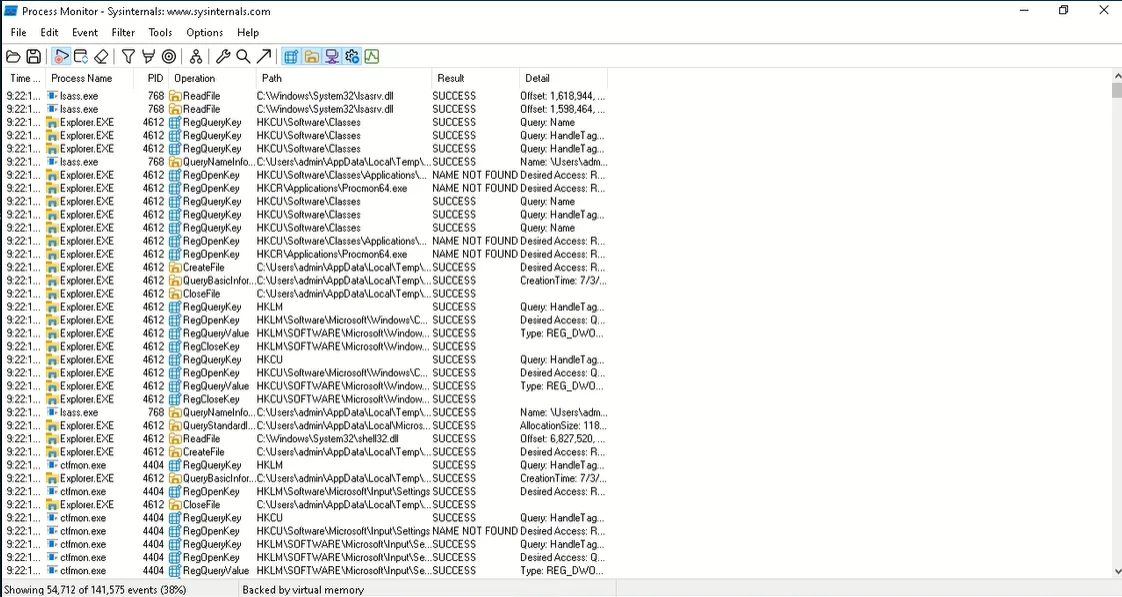
- Process Monitor — real-time file, registry, process and network activity with boot-time logging. It’s the answer to “why does this app fail only for non-admins”.
- Autoruns — every autostart location, from Run keys to scheduled tasks, services, WMI subscriptions and Winlogon entries. It can also run offline against another system’s registry.
- PsTools —
PsExec,PsList,PsKill,PsLoggedOn,PsService,PsInfo,PsLogList,PsShutdownand friends for remote work from a command prompt. - TCPView — live TCP/UDP endpoints mapped to processes.
- AD Explorer and AdInsight — an LDAP browser with snapshot/compare, and a tracer for LDAP calls an application makes.
- Sigcheck, AccessChk, LogonSessions, ProcDump, Sysmon and BgInfo, among many more.
The Suite page on Microsoft Learn was last updated in September 2026. Separate packages exist for Nano Server and ARM64, and the suite is also offered through the Microsoft Store. Individual tools can also be run straight from \\live.sysinternals.com\tools, which is handy on a box where you don’t want to leave files behind.
Rights and footprint
Most tools run as a standard user but show much less; elevated, they see every process and handle. Remote PsTools need admin rights on the target and SMB (TCP 445) access to the ADMIN$ share, plus RPC for some commands. PsExec works by copying a small service binary (PSEXESVC) into ADMIN$, creating and starting a service, and removing it afterwards. That has two consequences:
- It leaves clear traces: System log event 7045 (service installed), Security log 4697 if you audit it, and your 4624 network logon.
- Endpoint security products frequently flag PsExec because attackers use it too. Tell your security team before you roll it into routine support, and consider giving it a custom service name with
-r, which makes your own use easier to pick out in logs.
Process Monitor and Sysmon load kernel drivers, so they need admin rights and leave a driver-load event behind. Sysmon is a persistent service by design — you install it deliberately with a config file — whereas the others are run-and-exit.
The licence terms warn that saved captures (Procmon logs, dumps) may contain usernames, paths and other sensitive data. Treat .PML and .DMP files like any other confidential artefact.
Use only on systems you administer and with your organisation’s authorization. Remote execution and process inspection are admin functions; don’t use them on colleagues’ machines for anything outside support.
Where it’s strong
- Depth nobody else matches for single-machine diagnosis, written by people who know Windows internals.
- Free for any number of copies on your devices, including commercial use.
- Nothing to install for most tools; they run from a folder or a share.
- Signed Microsoft binaries that fit neatly into allow-listing policies.
Where it falls short and who should skip it
It’s a toolbox, not a console. There’s no inventory, no multi-machine dashboard and no central logging of what you did. Remote work means command-line PsTools or opening an RDP session and running the GUI tools locally. Process Monitor captures are huge and take practice to filter. PsExec’s detection profile means some environments block it outright, and you may be asked to justify it. The licence also forbids republishing the tools for others to copy, so you can’t bundle them into a product you distribute. If you need a friendly GUI for helpdesk staff who don’t live in the command line, a purpose-built remote process tool is kinder.
Who it suits
Every Windows sysadmin, honestly — but it pays off most for the person who gets escalations: the “it only fails on this one server” tickets, persistence hunts during incident response, and handle or DLL conflicts. Pair it with PowerShell remoting and you cover most single-host triage.
Licensing and cost
It’s free. The Sysinternals licence lets you install and use any number of copies on your devices; restrictions cover reverse engineering, republishing the software for others and using it for commercial hosting services. Support is “as is”. There’s nothing to buy, but read the terms at the source if you plan to embed the tools in scripts you hand to customers.
How it compares
For remote processes specifically, Remote Process Explorer vs Sysinternals weighs PsList/PsKill against a GUI built for that one job, and the LizardSystems Remote Process Explorer review has the detail. Windows Admin Center covers the browser-based side of server management, and Wireshark picks up where TCPView stops, at the packet level. More in Server & Workstation Triage, and a worked example in find and end a hung process on a domain workstation.
Getting it safely
Get it from Microsoft Learn’s Sysinternals pages or the Microsoft Store listing. Microsoft doesn’t post hashes alongside the files, so verify the Authenticode signature instead: Get-AuthenticodeSignature .\procexp64.exe should report a valid Microsoft signature, or use the suite’s own sigcheck -a. General advice is on our where to get it page.
FAQ
Is Sysinternals Suite really free for business use?
Yes. The licence permits any number of copies on your devices. The limits concern redistribution, reverse engineering and commercial hosting, not internal use.
Why does antivirus complain about PsExec?
Because the same technique — pushing a service through ADMIN$ — is common in intrusions. Many products alert on it by default. Agree an exception with your security team rather than disabling detection wholesale.
Does the suite update itself?
Not the folder copy. The Microsoft Store version updates through the Store, and \\live.sysinternals.com\tools always serves current builds.
Which tool shows who is logged on to a remote machine?
PsLoggedOn \\server lists local and resource-share logons; for RDS hosts quser /server:name is often quicker.