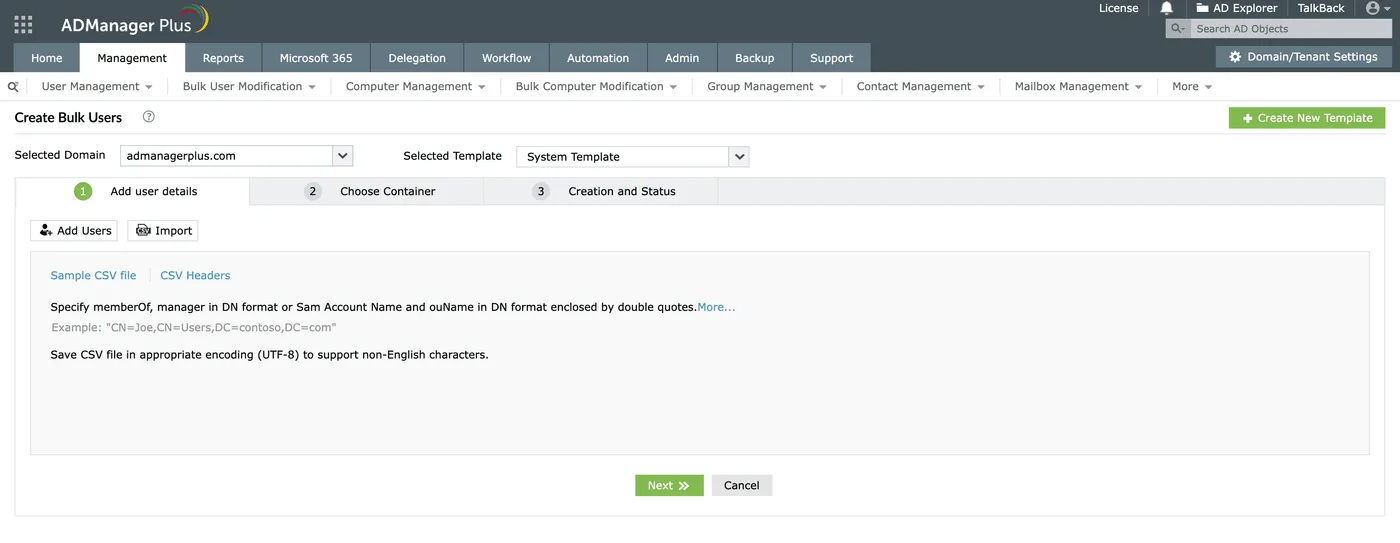
HR sends a spreadsheet on Friday afternoon: fourteen new starters Monday, each needing an account in the right OU, a home folder, three department groups, an Exchange mailbox and a manager set. You could write the PowerShell — Import-Csv | New-ADUser with a dozen parameters — and most admins eventually do. The catch is the second and third time, when the script lives on one person’s laptop and the helpdesk still has to ping you for every password reset. ManageEngine ADManager Plus sells the alternative: a web console where provisioning is a template, resets are delegated, and every change goes through a logged, optionally approved workflow.
What it does
ADManager Plus is an on-premises web application for managing Active Directory and related systems. The main areas:
- Provisioning and bulk changes. User creation templates that set OU, groups, attributes and home folder; CSV-driven bulk create, modify, move, enable/disable and delete; the same for computers, groups and contacts.
- Delegation. Helpdesk technicians get specific tasks — reset password, unlock account, modify selected attributes — scoped to OUs, without holding AD permissions themselves. The application performs the change using its own service account.
- Workflows. Requests can pass through reviewer, approver and executor stages with SLAs. This turns “can you add me to the Finance share group” into a request with an approval trail.
- Automation. Scheduled tasks such as disabling accounts inactive for 90 days, moving them to a quarantine OU, and cleaning up after a retention period. Orchestrated leaver processes that span AD and linked systems.
- Reports. The vendor advertises over 200 AD reports — inactive users and computers, password expiry, group membership, NTFS permissions, logon activity — schedulable and exportable.
Exchange and Microsoft 365 tasks sit alongside AD in the same console, with the exact scope depending on edition and add-ons. At the time of writing the latest release notes list build 8043 (July 2026), which included security fixes and a bundled PostgreSQL update.
Rights, ports and the audit trail
The architecture shapes your risk model. ADManager Plus runs as a Windows service with a Tomcat web server on 8080/8443 by default and a bundled PostgreSQL database (Microsoft SQL Server 2014–2022 is also supported). It connects to domain controllers on LDAP 389/636, Global Catalog 3268/3269, Kerberos 88, RPC 135, SMB 445 and 139, Kerberos password change 464 and WinRM 5985/5986, per the vendor’s system requirements.
Technicians authenticate to the web console; the application does the work with the account you configure for each domain. That account needs whatever rights your delegated tasks require — often more than you’d like. Rather than using a Domain Admin, delegate precisely on the OUs in scope, and give it only what the enabled features need. The ManageEngine server then becomes a tier-0-adjacent asset: patch it quickly (the product has had security fixes like any web app), serve the console over HTTPS only, and restrict network access to it.
For the audit trail, the console keeps its own log of technician actions, which is the useful part. In the DC’s Security log, changes appear under the service account, not the technician. If you rely on native event logs or a separate auditing product, correlate them with the console’s log or you’ll only see the service account.
Where it’s strong
- Removes repetitive AD chores and the scripts behind them, with templates non-experts can use.
- Genuine least-privilege delegation for helpdesk staff, who never need AD rights directly.
- Approval workflows that give change control a paper trail.
- Deep canned reporting, which is often what justifies the purchase to auditors.
Where it falls short and who should skip it
It’s a big product to own: a web service, a database, Java-based components, a privileged service account and regular security updates. Licensing by domain and technician can climb as the helpdesk grows, and advanced modules are add-ons. The free edition is limited to a small number of objects (the vendor states 100 domain objects), so it’s an evaluation aid, not a free tier for real domains. It manages; its own logs record what it did, but it isn’t a change-auditing platform for changes made elsewhere — that’s a different product category. A two-admin shop with 150 users and good PowerShell habits can usually do without it.
Who it suits
Organisations with a few hundred to several thousand AD accounts, a separate helpdesk, and HR-driven joiner/mover/leaver volume. Also shops facing access reviews or audits that want scheduled reports and approval records without building them.
Licensing and cost
ManageEngine describes licences as domain-based, priced by number of help desk technicians, with both annual subscription and perpetual options plus add-on modules. At the time of writing, the product page showed Standard starting at $595 and Professional at $795; these entry prices cover a minimal configuration, so expect a quote for real sizing. A free edition exists with the object limit noted above, and a trial covers the full product. Check the vendor’s current pricing page and store before budgeting.
How it compares
Netwrix Auditor answers a different question — who changed what, anywhere — and the two are often bought together; ADManager Plus vs Netwrix Auditor explains where each fits. The free baseline is RSAT with the ActiveDirectory PowerShell module; see how far that goes in find and clean up stale computer accounts in Active Directory. More in Active Directory Management & Auditing.
Getting it safely
Get ADManager Plus from ManageEngine’s own product pages. Check the digital signature on the package before running it, and after deployment put the console behind HTTPS with a trusted certificate. Our where to get it page covers the general approach.
FAQ
Does ADManager Plus need an agent on domain controllers?
For core AD management it connects to DCs over standard protocols (LDAP, Kerberos, RPC, SMB, WinRM). Check the vendor documentation for specific modules that might add components.
Which account does it use to make changes?
The service account you configure for each domain. Technicians act through the console and their actions are logged there, while AD records the change under the service account.
Is there a cloud version?
The core product is installed on your own Windows server. It manages cloud services such as Microsoft 365 alongside on-premises AD, depending on edition.
What does the free edition include?
Core management and reporting, limited to 100 domain objects according to the vendor. It works for evaluation in a lab, not for production domains.