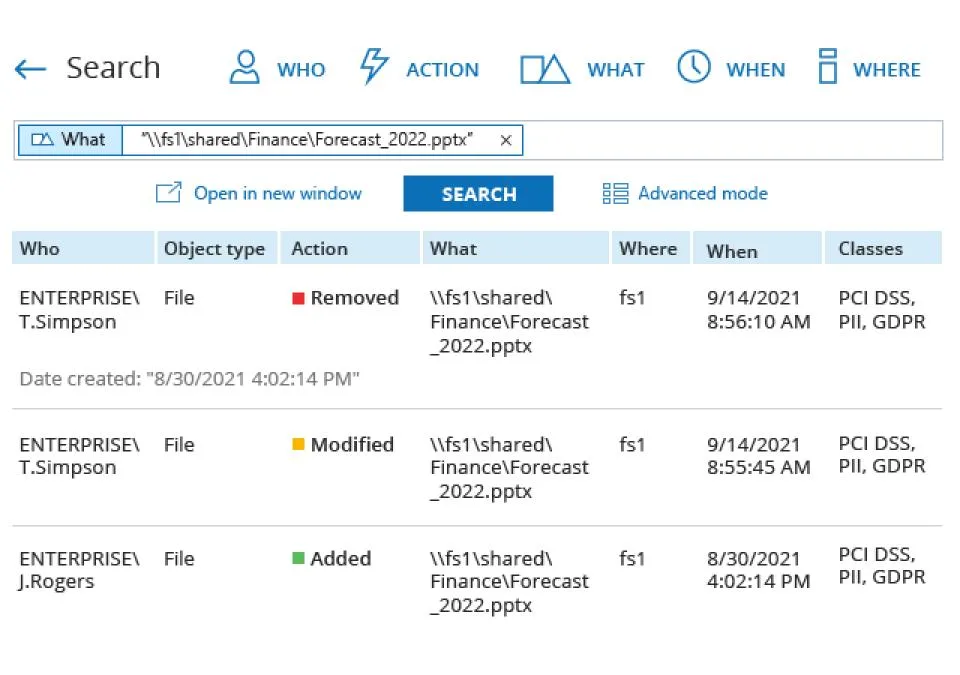
Tuesday morning, a department can’t reach its share. Someone removed the Finance group from the folder’s ACL, and someone else — or the same person — edited a GPO that drives drive mappings. Event Viewer has the raw material: 4670 for permission changes if you had object access auditing on, 5136 for the GPO’s AD object, 4662 for the directory access. What it doesn’t have is a sentence that says “CORP\adm-tlee changed the NTFS permissions on D:\Shares\Finance at 17:42 yesterday, old value / new value”. Netwrix Auditor produces that sentence, for AD, Group Policy, file servers and a long list of other systems.
What it does
Netwrix Auditor collects audit data from supported systems, normalises it into a common “who, what, when, where, old value, new value” format and stores it for search, alerting and reports. The vendor lists sources including Active Directory, Group Policy, Exchange, Microsoft 365 and Entra ID, SharePoint, Windows file servers and several NAS platforms, Windows Server itself, SQL Server, Oracle, VMware and network devices.
For a Windows domain admin, the core uses are:
- AD and Group Policy change reports with before/after values — including which GPO setting changed, not only that the GPO object was modified.
- File server activity — reads, changes, deletes and permission changes, which is what you need after an accidental mass delete or a ransomware scare.
- Logon activity — successful and failed logons across the domain, including RDP.
- State-in-time reports — what group memberships or permissions looked like on a given date, useful for access reviews.
- Alerts — for example, an email when someone is added to Domain Admins.
- Interactive search — a Google-style query over all collected events.
At the time of writing the current release is version 10.9 (June 30, 2026), which added state-in-time reporting and risk assessment for Azure Files; 10.8 shipped in July 2025.
Rights, prerequisites and the audit trail
This is an auditing product, so its requirements are mostly about making Windows record enough. Plan for:
- A dedicated Windows Server for the Auditor server, plus Microsoft SQL Server for the audit database and SQL Server Reporting Services for reports. SQL Express works for small estates but its database size limit fills quickly.
- Audit policy. Netwrix can configure it automatically or you set it via GPO: Advanced Audit Policy for account management, directory service changes and logon events, and object access auditing plus SACLs on the folders you monitor. Increase Security log sizes on DCs so events survive until collection.
- A data collection account with the rights each source needs. For AD, that means reading the Security log and the directory, which is less than Domain Admin, and the vendor documents the minimal set. Use a group-managed service account where the documentation allows.
- Network access from the Auditor server to DCs and file servers over RPC and SMB, plus SQL traffic to the database.
Collection is largely agentless and based on native logs, though some sources support optional agents or compression services to cut network traffic on busy servers. The long-term archive and SQL database become sensitive records themselves — protect them like backups, restrict report access, and define retention to match policy.
Use with your organisation’s authorization and a documented purpose. File and logon activity data describes what individuals did; handle it under your privacy and HR policies, not as ad-hoc browsing.
Where it’s strong
- Clear before/after reporting for AD and Group Policy, which native logs make painful.
- Many sources in one search, so a single question can span AD, a file server and Microsoft 365.
- Compliance report packs that map to common frameworks and satisfy auditors quickly.
- Alerts on high-risk changes such as privileged group membership.
Where it falls short and who should skip it
It records; it doesn’t manage or roll back most changes, so you still need AD tooling to fix what it reveals. The footprint is real: a server, SQL Server and SSRS, audit policy tuning, SACL design and ongoing capacity planning for busy file servers. Pricing is quote-based except for small-business self-service, so budgeting takes a sales conversation. If you already run a SIEM with Windows Event Forwarding and good parsing, much of the value overlaps. And a 20-user office with a single DC is likely better served by native audit policy plus a few saved Get-WinEvent queries.
Who it suits
Mid-size organisations with regulatory or insurance-driven audit requirements, several admins with elevated rights, and file servers holding sensitive data. It is also a strong fit for teams recovering from an incident who realise they couldn’t say who did what.
Licensing and cost
Netwrix offers subscription and perpetual licences with quote-based pricing that depends on product and deployment model. At the time of writing, a self-service checkout for an Essentials Edition is available to organisations with up to 150 employees, and a 14-day free trial “with full access” is offered. No per-unit list prices are published. Check the vendor’s current pricing page for details.
How it compares
ManageEngine ADManager Plus manages AD with delegated workflows; Netwrix Auditor watches everything that changes, including changes made outside any tool. The trade-offs are in ADManager Plus vs Netwrix Auditor. For RDP-only logon history at a lower price, Remote Desktop Audit covers a narrow slice. Native options start with RSAT and event logs; see pull RDP logon history from event logs. More in Active Directory Management & Auditing.
Getting it safely
Get Netwrix Auditor or a trial through Netwrix’s own website. Verify the package’s digital signature before running, and deploy on a hardened server with restricted access. See where to get it for our general checklist.
FAQ
Does Netwrix Auditor need agents on domain controllers?
Collection is primarily agentless using native logs. Some sources offer optional agents or compression services to reduce traffic; check the documentation for your version and source.
Which database does it use?
Microsoft SQL Server for the audit database, with Reporting Services for reports, plus a file-based long-term archive.
Can it show what a Group Policy setting was before a change?
Yes, before/after values for GPO settings are one of its core AD features.
Is there a free edition?
At the time of writing the vendor offers a 14-day full trial and separate free utilities, but no free edition of Auditor itself.